REVIEW · POMPEI CAMPANIA
Pompeii Audioguide – TravelMate app for your smartphone
Book on GetYourGuide →Operated by MyWoWo Srl · Bookable on GetYourGuide
Pompeii plays well when it is in your pocket. I like that the TravelMate audio guide lets you explore with total autonomy and no paper ticket pickup, and I also like that the 16 tracks stay available for years with offline listening. One watch-out: getting started can feel a bit fiddly, and the online mode can be hit-or-miss without decent signal.
You’re basically hiring a smartphone voice to point you toward major sights and “curiosities” as you wander. The content is professionally produced, you can switch between listening and reading the text in the app, and earphones make a big difference. It’s also listed as wheelchair accessible, which helps if you need a route that works with your pace.
In This Review
- Key highlights at a glance
- Pompeii on demand: what TravelMate adds to a self-guided day
- Price and staying power: is $9 worth it?
- Getting your activation code and starting right at the gates
- Download instructions
- Where to find your activation code
- Listening strategy: offline mode, earphones, and signal reality
- The 16 audio stops: where to focus your eyes for best results
- Pompeii Introduction
- Frescoes
- Grand Theatre (Regio VIII)
- Basilica of the Friars
- Houses of Marcus Rufus and the Golden Bracelet (Regio VII)
- Lupanare (Regio VII)
- Temple of Apollo (Regio VII)
- The Roman Domus
- Thermae (Regio VII)
- The quiz section: a small tool that helps
- Languages and how to choose the one you’ll actually use
- Where this guide shines, and where you may want a backup
- It shines if you want:
- It may disappoint if you want:
- Who should book this Pompeii smartphone audioguide?
- Should you book this Pompeii audio guide?
- FAQ
- Do I need to pick up paper tickets?
- Is there a meeting point for this activity?
- How long is the Pompeii audio guide?
- Can I listen offline?
- Can I read the audio files in the app?
- How long is the guide valid after activation?
- What languages are available?
- What do I need to start using it?
- Does it work for wheelchair users?
- How much does it cost?
Key highlights at a glance

- No meeting point or paper tickets: download and start wherever you prefer.
- 16 audio pieces, 48 minutes total: a focused route you can repeat.
- Offline or online listening: use one or the other depending on your signal.
- Valid 1095 days from first activation: replay it on future trips or re-do stops.
- Text view and a quiz section: great for pausing and checking details.
Pompeii on demand: what TravelMate adds to a self-guided day

Pompeii is big, and the usual problem with self-guided visits is simple: you can look at ruins all day, but it’s hard to know what you’re looking at. This app-style audioguide tries to solve that by giving you audio that you can trigger as you move, without waiting for a group.
What I like most is the independence. There’s no paper ticket to pick up, no meeting point to hunt down, and you don’t have to handle a third-party device that’s been passed around. Since you use your own phone, you control the volume, the playback speed (if your phone/app settings allow), and whether you switch to text when the audio is competing with street noise.
The format is also friendly for real life. The whole Pompeii program is about 48 minutes spread across 16 audio content items. That doesn’t mean you’ll spend only 48 minutes in Pompeii. It means you have a complete “soundtrack” you can finish, repeat, or use as a spine for your route.
If you're still narrowing it down, here are other tours in Pompei Campania we've reviewed.



Price and staying power: is $9 worth it?

At $9 per person, you’re paying for a lot of flexibility rather than a live escort. The value comes from the combination of three things:
- You can listen as many times as you want
- It doesn’t expire for 1095 days from first activation
- You can use offline mode, so you’re not forced to gamble on network coverage inside ruins and courtyards.
If you’re the type who likes to revisit a place later in the day (or come back another year), this “keep it for years” feature is where the app can feel like a smarter buy than a one-and-done audio rental.
The flip side is that the program is still finite. Some people want a deep, cover-every-corner kind of guide, and this one is designed as a compact set of stops. If you were hoping to hear about every street and niche, the app’s shorter runtime might leave you wanting more. (The good news: the audio is meant to help you pick out key areas, not trap you into a strict script.)
Getting your activation code and starting right at the gates

This is built for zero-stress arrival. There’s no meeting point. You download the app, activate it using your code, and start listening where you want.
Download instructions
- Android: go to the Play Store and download the app called TRAVELMATE
- iOS: go to the App Store and download TRAVELMATE TM
Where to find your activation code
The 10-digit activation code lives under a barcode in your email or in the GetYourGuide app:
- In the email: open the activity details (or show your tickets), then view the big barcode in the orange frame. When the barcode window opens, the 10-digit small number under the barcode is your code.
- In the GetYourGuide app: show the ticket in the app, tap the big barcode in the orange frame, and again use the 10-digit small number under the barcode.
My practical advice: take a minute before you go in to confirm your code works and your audio starts playing. That small check can save you from the most common frustration—running into a stumbling block right when you’re surrounded by ruins.






Listening strategy: offline mode, earphones, and signal reality

You’ve got two ways to listen:
- online
- offline
The app also lets you read the text from the audio files, which is great when you want to scan a point quickly instead of replaying a track. Earphones are recommended, and honestly, they’re the difference between hearing the guide clearly and straining over wind, footsteps, and background noise.
One caution: the online experience can depend on having a decent signal. If your phone struggles at certain points (and it can in outdoor historic sites), switch to offline before you begin the main walk. That way, your route doesn’t turn into an accidental tech support mission.
The 16 audio stops: where to focus your eyes for best results

The route is structured around major places in Pompeii, with stop names that include Regio numbers (like Regio VII and Regio VIII). Even if you don’t memorize those regions, they help you understand the app’s logic: it’s grouping sights into chunks so you’re not bouncing randomly across the map.
Here’s how I’d use the stops for a smoother experience.
Pompeii Introduction
Start here. Think of it as your quick orientation so the rest of the audio makes sense. This is also where you’ll set your pace: do you want to walk while listening, or pause and read?
Potential drawback: if you’re the type who learns best from practical, punchy facts, an introduction track can feel slow compared to jumping into the first obvious sight.
Frescoes
This segment is all about visual details. If you want your visit to feel more than just “stones and walls,” fresco-focused audio is a strong early choice because you can look around and actually connect what you hear with what’s in front of you.
Tip: when you reach a fresco area, pause for a short moment to let your eyes adjust. Then hit play.
Grand Theatre (Regio VIII)
A theatre stop usually changes your perspective. Instead of staying in one building or doorway, you’re looking at a bigger public space. The audio here is useful if you want help visualizing how a theatre setting functioned as part of daily life.
If you prefer quieter moments, aim to time this stop when the crowd density feels manageable. Even with the guide, crowd levels can change how clearly you hear your audio.
Basilica of the Friars
This is another “public building” stop, and it works well mid-visit when your brain is starting to stitch the site together. If you’ve been looking at small details for a while, a basilica-type area can reset your focus to structure and layout.
If the narration feels too calm or drawn out to your taste, this is where the app’s text option becomes handy. You can read key lines quickly, then return to listening.
Houses of Marcus Rufus and the Golden Bracelet (Regio VII)
Domestic life is where Pompeii often feels most human. This segment is designed to connect names of specific house areas to what you can see around you.
I like placing this stop after you’ve already handled a couple of big public spaces. You get variety without losing context.
Lupanare (Regio VII)
This is one of the more “curiosity” categories in the list. If you’re curious about the stranger side of everyday ancient life, this segment is likely to be one you linger on.
Consideration: If you were hoping for a guide that feels dramatic and story-heavy, the tone may not match your expectations. One of the cautions you’ll want to keep in mind is that the narration style can come across as more informational than engaging.
Temple of Apollo (Regio VII)
A temple stop gives you a different kind of sightseeing checklist. You’re looking for the area’s religious significance, plus how its setting fits into the larger urban plan.
Since the app includes “curiosities” along with history, expect this track to explain what makes the space notable in a general way rather than turning it into a long academic lecture.
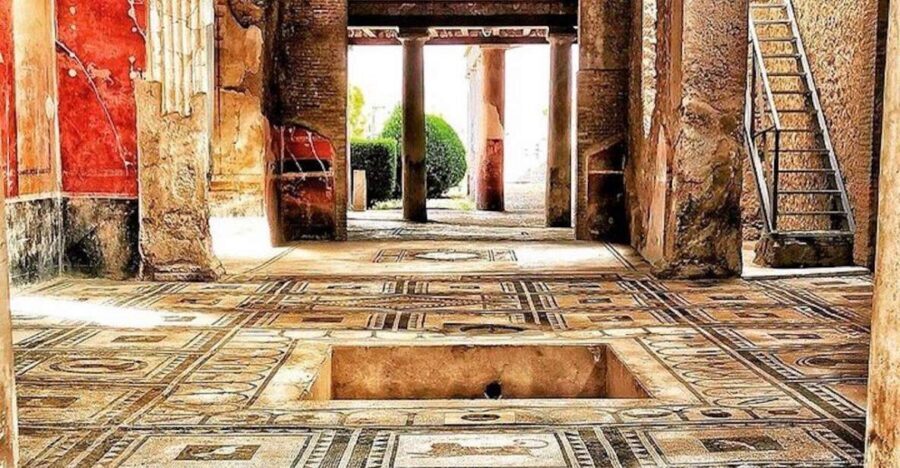
The Roman Domus
This segment is likely about another housing type or domestic setting within the route. If the earlier house stop sparked your interest, this one helps you compare how residential spaces can feel different from one another.
Try this approach: listen once while walking in, then switch to reading the text while you stand still for a minute. It keeps you from feeling rushed.
Thermae (Regio VII)
Baths are one of the best “category” stops because they help you picture daily routines, not just buildings. This segment is a natural closer for a themed walk because it moves you from houses and public spaces into the rhythm of common activity.
Practical tip: bring water and don’t treat the audio as a timer. Use the track as a guide for where to look, then let your legs and curiosity finish the job.
The quiz section: a small tool that helps

The app includes a quiz section with short questions about Pompeii. This is a nice feature if you learn better by testing yourself, or if you want to break up a long walk with something interactive.
I find quizzes work best at two moments:
- near the end, to lock in what you just saw
- during a slower pace afternoon, when you want to take micro-breaks without fully stopping
Languages and how to choose the one you’ll actually use

The audio is available in multiple languages: Italian, English, Spanish, German, Russian, Chinese, and French.
Pick your language before you start, not midway through the walk. Switching languages on the fly can interrupt your rhythm, and you don’t want to spend precious sightseeing minutes hunting inside the app menus.
Where this guide shines, and where you may want a backup

This isn’t a live guide, and it isn’t trying to be. It’s a well-structured set of audio stops for independent wandering.
It shines if you want:
- Total autonomy with no paper tickets or meeting point
- A guide you can replay over and over
- Offline access so your day doesn’t depend on constant signal
- A smaller route with enough structure to keep you oriented
It may disappoint if you want:
- A guide that covers everything in Pompeii with equal depth
- Fast, high-energy narration with lots of playful “fun facts”
- A truly cinematic storyteller vibe
One of the biggest practical lessons here is this: if you want the audio to feel gripping, give it your full attention at each stop. If you half-listen while scrolling or stopping constantly, the narration style can feel even more “flat” than it would if you were focused.
Who should book this Pompeii smartphone audioguide?

This works especially well for:
- independent travelers who prefer building their own route
- people visiting Pompeii for the first time who want a clear set of stops without hiring a guide
- anyone who likes repeatable experiences (since it lasts 1095 days)
- visitors who want offline reliability
If you’re the type who always wants the biggest possible coverage and a deeper, corner-to-corner explanation, you might combine this with your own reading offline (or consider a more extensive guide for a first visit). But as a focused spine for a self-guided day, it’s a solid fit.
Should you book this Pompeii audio guide?
I’d book it if you want a simple, flexible Pompeii plan at a fair price, and you like the idea of controlling your pace. The strongest reasons to choose it are the autonomy, the offline option, and the ability to replay the audio for 1095 days.
I’d hesitate if you’re very picky about narration style or you know you get annoyed by setup that isn’t instant. In that case, do a quick activation test before you enter the site, and download for offline listening early.
If you want a clean match: bring earphones, set your language, and treat the 48-minute audio route as a guide for what to look for—not a script you must follow.
FAQ
Do I need to pick up paper tickets?
No. You organize your visit in autonomy using the TravelMate app on your smartphone.
Is there a meeting point for this activity?
No. There is no meeting point. You download the app and start your experience wherever you prefer.
How long is the Pompeii audio guide?
The guide includes 16 audio content pieces for a total of 48 minutes.
Can I listen offline?
Yes. You can listen online or offline.
Can I read the audio files in the app?
Yes. The app lets you read the text of the audio files.
How long is the guide valid after activation?
It’s valid for 1095 days from your first activation.
What languages are available?
Italian, English, Spanish, German, Russian, Chinese, and French.
What do I need to start using it?
Download the TravelMate app and use your 10-digit activation code from your email (or from the GetYourGuide app).
Does it work for wheelchair users?
It’s listed as wheelchair accessible.
How much does it cost?
The price is $9 per person.