
REVIEW · NAPLES
Naples: Pompeii Self Guided Audio Tour
Book on GetYourGuide →Operated by ITGUIDES · Bookable on GetYourGuide
Pompeii with no crowds herding you. I like the geolocated map with 60+ audio/photo/text points and the fact you can reuse the audio guide forever on future visits. The main thing to plan for: you need to download the content ahead of time because internet in the site is often unreliable.
This is a true phone-based tour, so you don’t have to match anyone else’s pace. You can drift between the amphitheater, the House of the Vettii, and even the lupanare (brothel) while listening to short, story-driven stops. One possible drawback: the app behavior can be a little fiddly if you leave the audio screen to take photos or if multiple clips sit at one location.
If you’re comfortable using your phone for directions, this is one of the best-value ways to see Pompeii’s highlights.
In This Review
- Key things I’d circle before you go
- Naples to Pompeii at your pace: what this self-guided format really gives you
- Price and value: $4.70 is only cheap if it works when you arrive
- Getting the ITGUIDES app ready before Pompeii: the step that makes or breaks it
- Pompeii highlights through geolocated stops: how the 60+ points shape your walk
- Amphitheater: listen for the people, not just the stone
- House of the Vettii: frescoes, daily life, and the human scale
- Lupanare, baths, and Roman everyday life: the stuff you won’t get from Instagram photos
- Navigating with the interactive map: easy when it behaves, annoying when it doesn’t
- Languages, audio style, and support: what you’ll notice during your walk
- Who should book this Pompeii audio tour (and who might want a different approach)
- Should you book this Pompeii self-guided audio tour?
- FAQ
- Does this include Pompeii site entrance tickets?
- Is there a meeting point for the tour?
- Do I need an internet connection inside Pompeii?
- How long is the audio guide available?
- What languages are available?
- Is this activity wheelchair accessible?
Key things I’d circle before you go
- 60+ geolocated points of interest with audio, photos, and text so you know what you’re standing in front of
- Smartphone-first freedom to start wherever you want and move at your pace during open hours
- Download-and-go offline style so the guide works even when reception is poor
- Big price advantage versus audioguides sold on site, with the audio staying with you for future visits
- Support when you need it, including fast help getting the app installed and working
Naples to Pompeii at your pace: what this self-guided format really gives you
This Pompeii experience is built for one big idea: you control the route. After you activate the guide, you can walk the ruins in whatever order makes sense to you, instead of being stuck with a group pace. It’s also designed to reduce the usual Pompeii problem—standing in front of a wall and thinking, I’m not sure what I’m looking at.
The audio content focuses on the places people actually want to understand: the amphitheater, the House of the Vettii, the lupanare, and the practical side of Roman life like baths and food. I like that the guide doesn’t treat Pompeii as just pretty ruins. It tries to answer the questions you’d naturally have while walking—how did the baths work, what did people eat, and how did everyday trades happen.
Your “tour duration” is 4 hours from your first activation. That’s long enough to hit a solid set of highlights without feeling like you’re sprinting, especially if you listen to most stops in sequence. You’ll also run into restoration and closure issues, and the self-guided design helps because you can skip what’s shut and pivot to what’s open.
If you're still narrowing it down, here are other tours in Naples we've reviewed.



Price and value: $4.70 is only cheap if it works when you arrive
At $4.70 per person, this is priced like a low-cost add-on—and it can be a great value if you’ll actually use the map and audio. The standout claim is savings of more than 50% compared with the audioguide sold at the ticket office. That matters because Pompeii audioguides elsewhere can be expensive, and you still have the same issue: you’re staring at stone and fresco fragments wondering what they mean.
Two value points are worth your attention:
- You keep the audio guide for future visits, so it’s not a one-and-done purchase.
- The guide gives you more than audio. It also includes an interactive map plus text and photos tied to specific locations.
To be fair, value depends on your phone habits. If you don’t like using your smartphone for navigation, or you forget to download content before entering the ruins, that low price can turn into frustration. The good news: the guide is designed around geolocation and offline use, so the product’s “cheap” only works if you plan one step carefully.
Getting the ITGUIDES app ready before Pompeii: the step that makes or breaks it
You don’t show up and wait for a person. This is a full online setup. After purchase, you download the ITGUIDES app from your app store. Then you go into the app menu, use the contact flow on the contact page, and send your app user ID plus your order number so the Pompeii guide can be activated inside the app.
Once it’s ready, you can tap through the guide points. The guide also uses hypertext-style descriptions: if a name of a god, hero, or technical term appears, you can click for extra information. That’s useful when your brain wants context, not just narration.
Here’s the key practical advice: download the contents with a good cellular signal or Wi‑Fi before you head into Pompeii. Internet inside the archaeological site can be spotty. The guide is designed to work better when the files are already on your phone, so treat download time like part of your sightseeing, not an afterthought.
If you get stuck installing or activating the app, there’s real human help. One user specifically mentioned fast assistance from Vincenzo to get the guide on their phone.
Pompeii highlights through geolocated stops: how the 60+ points shape your walk
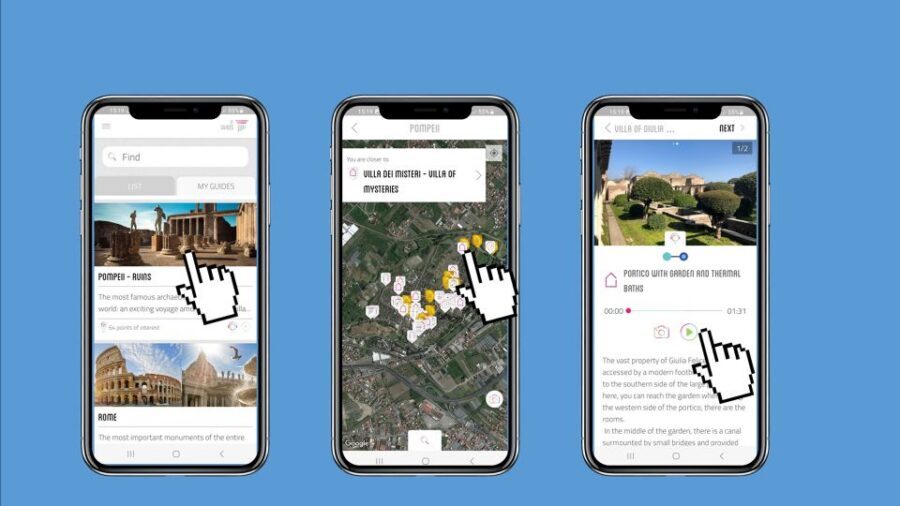
The guide includes more than 60 geolocated points of interest, each paired with audio and supporting visuals like photos, plus text. The “geolocated” part is the difference between a normal audio tour and one that feels like it’s helping you stay oriented.
On the ground, you’re not just pressing play randomly. You can follow the map to reach points of interest you care about—then listen to stories tied to what you’re seeing. The map also uses check marks to show what you’ve already visited, which helps you avoid that common problem of double-walking areas and still feeling like you missed something.
One note from experience-based feedback: when a location has more than one clip, the check mark behavior may be inconsistent. Some locations play multiple audios, but the map’s “you listened” indicator might not appear the same way. It doesn’t necessarily block the audio, but it can make your progress feel a bit confusing.
Still, the format works well for exploring at your pace. Many stops have audio that’s short and easy to fit into walking breaks. That’s ideal in Pompeii, where you’ll be moving constantly and stopping often for photos, shade, and snacks.
Amphitheater: listen for the people, not just the stone

The amphitheater is one of the big “wow” areas in Pompeii, but it can also feel like just seats and walls unless someone gives you the human side. This guide’s amphitheater section is meant to explain what you’re looking at while you’re standing there—so you understand how the space functioned and why it mattered.
If you’re the type who likes to connect buildings to behavior, you’ll appreciate the focus on how Roman public spaces worked. It’s also a good anchor point for the rest of the day. Once you understand the amphitheater’s role in entertainment and civic life, you notice more details elsewhere—like how Pompeii’s neighborhoods, homes, and businesses shaped everyday routines.
A practical tip: plan for restoration. Pompeii has ongoing work and some places may be closed. Because your tour is self-guided, you can move around closures instead of losing your whole schedule.






House of the Vettii: frescoes, daily life, and the human scale

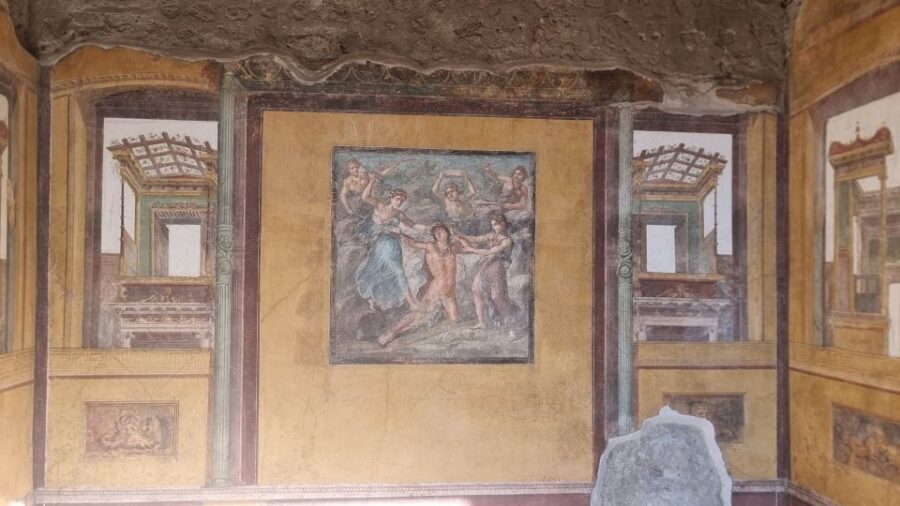
The House of the Vettii is one of those Pompeii stops that people point to because it feels vivid, even through the rubble. With this guide, you’re not left to figure out what each room is by yourself. The audio and map points are designed to guide you through the most interesting parts and pair that movement with explanations.
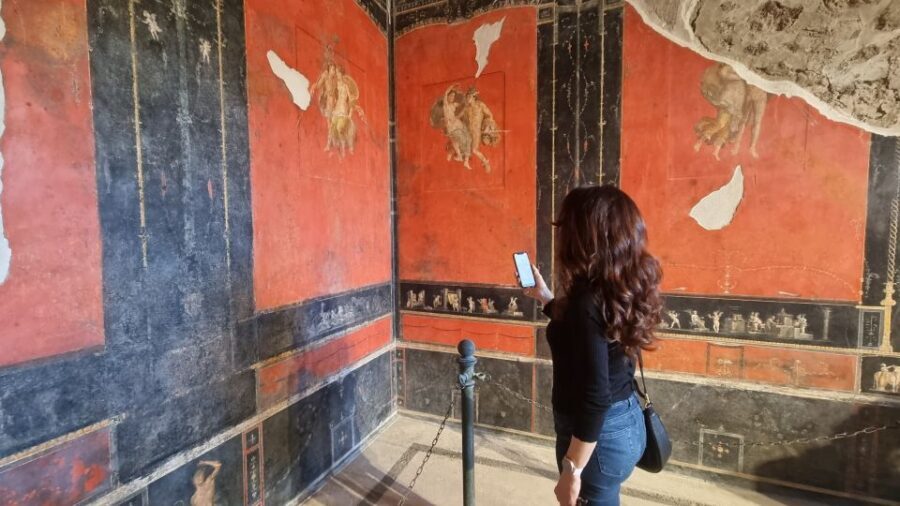
I like this kind of house visit because it connects architecture to personality. You begin to see how people lived, how rooms were used, and what the decorated surfaces were communicating. The guide also nudges you toward the best-preserved frescoes and mosaics through the map, so you have a higher chance of spending your limited time where the details still shine.
Potential drawback: house layouts can be confusing when you’re walking through multiple small areas. If you rely heavily on the app’s location tracking, watch how your phone handles the GPS signal in ruins and shadows. In most cases it still works, but a couple of app-control quirks show up after audio playback.
Lupanare, baths, and Roman everyday life: the stuff you won’t get from Instagram photos
If you want Pompeii to feel like more than buildings, this guide leans into daily life. It includes audio for the lupanare (brothel), along with practical explanations connected to Roman baths and habits of everyday living.
The baths portion is especially useful if you’ve never tried to picture how a Roman bath experience worked. Instead of treating it like a vague bathing room, the guide aims to explain how the system functioned. That kind of “how it worked” framing makes Pompeii feel less distant.
Food and trade details are part of the appeal too. The guide covers what people ate in Roman taverns, how bread was made, and even the practical—sometimes surprising—details of wool processing, including the use of urine. It’s frank and very “this is how life actually worked” in tone, which I find makes the site more memorable than generic narration.
You may also notice the guide’s map and point list are built to help you find the most visually strong sections, like preserved frescoes and mosaics. That’s the right goal in Pompeii, where time runs out fast.
Navigating with the interactive map: easy when it behaves, annoying when it doesn’t

The interactive map is a big reason this works for many people. It helps you move between points of interest without flipping between multiple paper maps or guessing where the next stop is. Some users also mentioned a satellite-style orientation that helps you reach geolocated spots.
Two practical friction points came up in feedback that you should know about before you rely on the app too heavily:
- After listening to an audio point, the app may send you back to the main map and zoom out, so you may need to zoom back in to find your location.
- If you exit the audio screen—like to take a photo—the app can restart and you might have to re-navigate to your last point.
One more small quirk: some users wanted a clearer on-screen dot marking your exact location. If your phone’s GPS is jumpy or you’re in a dense area, that missing “I am right here” indicator can make navigation feel like guesswork.
My advice is simple: treat the map as your guide, but don’t treat it like a perfect GPS system. Pompeii is full of stone shadows and narrow passages. If you accept that reality, the app still does a great job of keeping you on track.
Languages, audio style, and support: what you’ll notice during your walk

The audio guide is available in multiple languages: Italian, English, French, German, and Spanish. That flexibility is a big plus if you’re traveling with someone who wants their own language option rather than sharing earbuds and compromising.
Audio style seems designed to be listenable in short bursts. Some descriptions are broken into easy-to-consume segments so you can keep moving without constantly stopping for long narration blocks. That’s the right format for Pompeii, where you’ll constantly pause for photos and to read plaques you encounter.
Support is also part of the package. You can contact the team via WhatsApp using a number found inside the ITGUIDES app menu. If you get stuck at activation time or can’t find where the guide is stored in the app, having that in-app contact can save your day.
Who should book this Pompeii audio tour (and who might want a different approach)
This is a strong fit if:
- you like self-guided sightseeing and want control over pacing
- you want the best major Pompeii highlights without paying a premium
- you’re comfortable using your phone for navigation and audio
- you’re okay doing one crucial prep step: downloading the content ahead
It may be less ideal if:
- you hate relying on GPS in ruins
- you don’t want to manage phone settings and screen switching
- you need a strict, human-led structure to feel oriented
If you’re a solo traveler, this format is especially practical. You won’t have to coordinate with a group’s “one more room” energy. If you’re traveling as a couple or small group, you can either rotate listening or each use your own phone to follow the map at the same time, which keeps the walk smooth.
Should you book this Pompeii self-guided audio tour?
I’d book it if you want a value-priced way to understand Pompeii’s key sites and you’re willing to do one job correctly: download the guide content before you enter the ruins. The combination of geolocated points, short audio segments, and reusable access for future visits makes the $4.70 price feel justified, not gimmicky.
Skip it or consider a different approach if you know you’ll be battling phone battery, weak signal, or app navigation anxiety. Pompeii is a maze of stone paths, and this guide works best when you treat your phone like an essential tool, not a backup.
If you can plan that download step and keep your expectations realistic about GPS in ruins, you’ll get a smart, flexible Pompeii day that feels like it explains what you’re actually seeing.
FAQ
Does this include Pompeii site entrance tickets?
No. Your Pompeii entrance ticket is not included. You’ll need to buy tickets separately.
Is there a meeting point for the tour?
There is no meeting point. It’s fully self-guided, based on smartphone app use, and you can start where you want during the ruins’ open time.
Do I need an internet connection inside Pompeii?
You’ll want to download the guide contents before you go, because internet connection can be poor in the archaeological site.
How long is the audio guide available?
The guide is valid for 4 hours from the first activation.
What languages are available?
The audio guide is available in Italian, English, French, German, and Spanish.
Is this activity wheelchair accessible?
Yes, it’s listed as wheelchair accessible.